My network
This post outlines how the networking for my self hosted services are setup, including how I use my domain with my dynamic public IP address (I am not willing to pay for a static IP) without using a DDNS service.
The description of the network will be purely practical. I will not be describing the transfer of packets to the highest possible precision.
The clients are categorized into local clients and global clients. Global clients refers to clients that, regardless of location, connect to the server through the domain name as registered on a public DNS. If the clients connect to the services on the server by either mapping the domains to the local IP address of the home server, or directly connect to the home server through the local IP address, they are local clients.
The following image shows an (imperfect) overview of the setup:
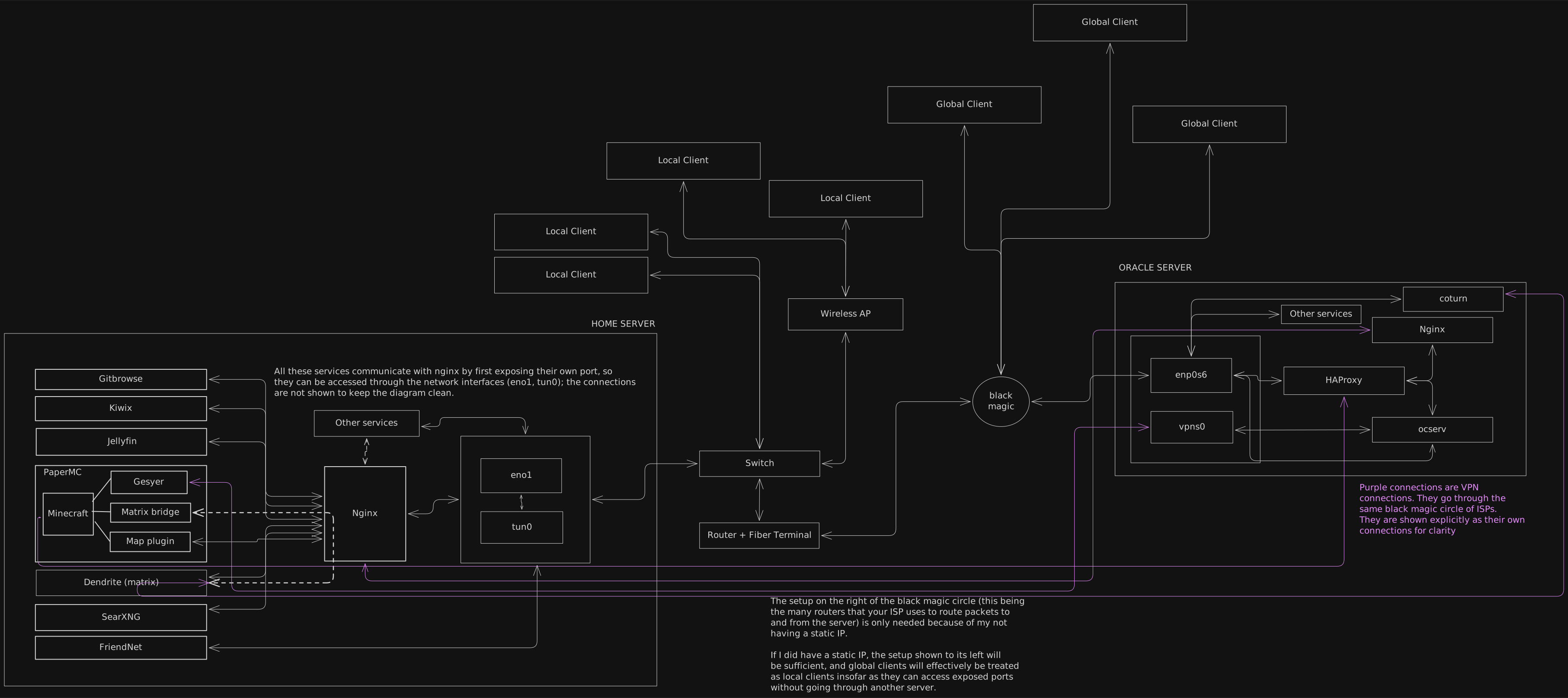
Home server IP addresses:
eno1    192.168.1.2
tun0    10.10.10.208
Each service can be accessed through its own port. For
example, the Jellyfin instance is accessible on port 8096. Nginx
however lets you map a domain/subdomain to this port. Under
http in nginx.conf, the following lines
proxy https://tv.lewoof.xyz to
http://127.0.0.1:8096:
server {
    listen 443 ssl http2;
    server_name tv.lewoof.xyz;

    ssl_certificate /etc/letsencrypt/live/oc.lewoof.xyz/fullchain.pem; # managed by Certbot
    ssl_certificate_key /etc/letsencrypt/live/oc.lewoof.xyz/privkey.pem; # managed by Certbot
    include /etc/letsencrypt/options-ssl-nginx.conf; # managed by Certbot
    ssl_dhparam /etc/letsencrypt/ssl-dhparams.pem; # managed by Certbot

    client_max_body_size 500M;
    ssl_protocols TLSv1.3 TLSv1.2;

    location / {
        proxy_pass http://127.0.0.1:8096;
        proxy_http_version 1.1;
        proxy_set_header Upgrade $http_upgrade;
        proxy_set_header Connection "upgrade";
        proxy_set_header Host $host;
        proxy_set_header X-Real-IP $remote_addr;
        proxy_set_header X-Forwarded-For $proxy_add_x_forwarded_for;
        proxy_set_header X-Forwarded-Proto $scheme;
        proxy_set_header X-Forwarded-Protocol $scheme;
        proxy_set_header X-Forwarded-Host $http_host;

        # Disable buffering when the nginx proxy gets very resource heavy upon streaming
        proxy_buffering off;
    }
}
Now on the local network, if the DNS points
tv.lewoof.xyz to 192.168.1.2, nginx will
proxy the request to Jellyfin.
Before setting up certbot, the same block would have
listen 80 instead of 443. When
certbot --nginx is run, it will be changed to 443 and
SSL certificate lines will automatically be added. Certbot will
fail complaining that there are no services on port 80 if there is
no server block listening on port 80. Use nginx -t to
test your nginx config if you could not get it to use port 80. In
order for Certbot to be able to generate certificates, the server
name for which I am trying to obtain a certificate has to be
pointing to the server’s public IP address, and port 80 should be
exposed to the internet. If Certbot cannot call
tv.lewoof.xyz on port 80 over HTTP and get a response
from my machine, it cannot give me a certificate for
tv.lewoof.xyz.
Not all services go through nginx. If a service (SSH for example) is not something I want to be able to access outside the local network, either physical or virtual, proxying to them through nginx is unnecessary.
So far this works great on the local network, and local clients
are satisfied. What about our friends from across the globe? If I
had a static IP, all it would take is to do some port forwarding
on the router and changing the DNS settings with Cloudflare to
point my domain to said IP. However, I do not have a static IP nor
do I want to pay my ISP for it. To address this, I setup an
openconnect server on a VPS and registered its IP with my domain
name. Now as this is the VPN server, it can access all the devices
connected to the VPN, and my home server is always connected on
10.10.10.208.
On this server I have Coturn, HAProxy, ocserv, and nginx. VPN traffic on openconnect is on port 443, the same port needed for nginx, and I could not get nginx to sit in front of the VPN server while having it proxy requests through the VPN server. I use HAProxy to decide based on SNI whether a request should be handled by nginx or by ocserv. I also use HAProxy to proxy requests that are not HTTPS traffic as it is much simpler to handle them directly in HAProxy.
I must also remark that running nginx on this VPS is unnecessary. I should be just fine handing over all of the HTTP and HTTPS traffic to the nginx instance on the home server, but an unfortunate temporary solution is still sticking around. From the HAProxy config shown below you should be able to see that what nginx instance you want to point to is arbitrary and does not make a difference as long as said instance is configured to proxy all the requests you expect.
defaults
    timeout connect         10s
    timeout client          1m
    timeout server          1m
    timeout tunnel          3h

# frontends

frontend www-https
   bind 0.0.0.0:443
   mode tcp
   tcp-request inspect-delay 5s
   tcp-request content accept if { req.ssl_hello_type 1 }
   use_backend bk_vpn         if { req_ssl_sni test.com }
   use_backend bk_nginx if { req_ssl_sni -i -m end .xyz }
   default_backend bk_vpn

frontend minecraft_front
   bind *:25565
   mode tcp
   default_backend minecraft_back

# backends
backend minecraft_back
   mode tcp
   server mc 10.10.10.208:25565 check send-proxy-v2

backend bk_vpn
   mode tcp
   option ssl-hello-chk
   server server-vpn 127.0.0.1:4443 send-proxy-v2

backend bk_nginx
   mode tcp
   option ssl-hello-chk
   server server-web 127.0.0.1:4444 check
Shown above is the entire HAProxy config file
(/etc/haproxy/haproxy.cfg). The HTTPS frontend
decides whether a request should be handled by ocserv (the VPN) or
nginx. If the requested SNI is test.com (I spoof the
SNI on all of my VPN requests, test.com here is used
to redact the actual SNI I want to use in the config), the request
is handled by ocserv. If the SNI ends in .xyz (my
domain name being lewoof.xyz), the request is handled
by nginx. You should also notice that any request sent on the
Minecraft port is forwarded to 10.10.10.208:25565.
This is the IP of the homeserver on the VPN, any request can be
forwarded directly to the homserver with this IP, including
server-web on bk_nginx. If I clean up my
config files, server server-web 127.0.0.1:4444 check
would be replaced with
server server-web 10.10.10.208:443 check. The nginx
instance running on this VPS also simply proxies each domain to
10.10.10.208 on the appropriate port.
What I have written so far serves the purpose of the post, viz., to be a basic outline of the networking setup that allows me to self host my services. The wrtiting combined with the diagram should be sufficient for anyone looking to create a setup to get started. Below are links to documentation that will be helpful. In the future, when the setup is cleaned up as described in the previous paragraph, there will be a post with more details on each service hosted.
Helpful documentation/articles:
- comfy.guide guide on nginx
- Arch Wiki/Nginx
- Arch Wiki/Certbot
- Openconnect documentation “How to share the same port for VPN and HTTP”
- comfy.guide guide on coturn
Add my RSS feed to your feed reader (start using RSS if you don’t already) to be notified when I post about each service in more detail.